Hop Hop Hop AI vs CapCut: Which Is Better for the Trend?
 Hop Hop Hop AI Team
Hop Hop Hop AI vs CapCut for the hop hop hop trend: what each tool actually does, when filming it yourself with CapCut wins, and when an AI video from photos makes more sense.
Make your hop hop hop video
Puppet master first
Hops first
Best results: one clear, front-facing subject per photo, waist-up or full body, good light. No sunglasses or heavy filters.
You'll get a 9-second silent video — add the original TikTok sound when you post.
You'll sign in first — your photos stay selected.
If you want to post the hop hop hop trend, you'll probably end up comparing two routes: film it yourself and edit it in CapCut, or generate it from photos with an AI tool. This Hop Hop Hop AI vs CapCut comparison explains what each one actually does, so you can pick the right tool for your situation. We make Hop Hop Hop AI, so we're not neutral, but we'll be straight about where CapCut is the better choice.
The short answer
- You have a partner, a free street and ten minutes: film it yourself and edit in CapCut. It's the authentic way to do the trend.
- You don't have someone to film with, your partner lives far away, or you want to hop with your dog: use an AI tool that makes the video from photos.
The rest of this post explains why.
What CapCut is
CapCut is a video editor from ByteDance, the company behind TikTok, available on phones, desktop and the web. It's an editor: you bring footage, and it helps you cut it, add text, effects, transitions and music.
CapCut is also known for templates. A template is a pre-built project with timing, effects and music already set up. You tap "Use template," then replace the placeholder clips or photos with your own media.
Is there a hop hop hop template in CapCut? When we searched CapCut's template site, we found user-made templates titled "Hop hop hop." The most-used one we saw is a 9-second, 9:16 template from a meme/green-screen account, tagged #brainrot, #meme and #greenscreen. Its page has no description, so we can't tell you exactly what it expects you to add. We didn't find an official CapCut template that recreates the puppet-and-swap routine from photos. Templates change all the time, so search "hop hop hop" in CapCut yourself to see what's there today.
The key point is that a CapCut template edits media you give it. If you want the real trend (one of you pulling strings, the other hopping in the background, then a swap), someone still has to film it, with two people in one place.
What about CapCut's AI? CapCut also offers a general AI image-to-video tool: you start from one or more images plus a written description of what you want, and it generates a short clip. That's a general-purpose tool, not a hop hop hop preset. Getting two specific subjects to do the puppet swap would mean writing and re-running your own prompts. CapCut's own guide acknowledges that generated videos can distort faces, for example with complex motion or conflicting instructions. We haven't tested it for this trend, so we won't claim how well it does.
What Hop Hop Hop AI is
Hop Hop Hop AI does one thing: it turns photos into a hop hop hop video.
- Upload two photos (one person or pet each) or one photo of both.
- Get a ~9-second, 9:16 vertical video of the puppet-and-swap routine in about 2–3 minutes. We email you when it's ready.
- No watermark, and the video is silent so you can add the trend sound in TikTok.
- No prompts to write and nothing to film.
Here's a real example, made from two photos:
Input photos
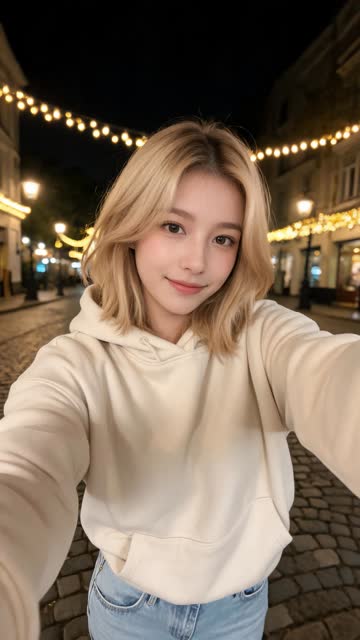
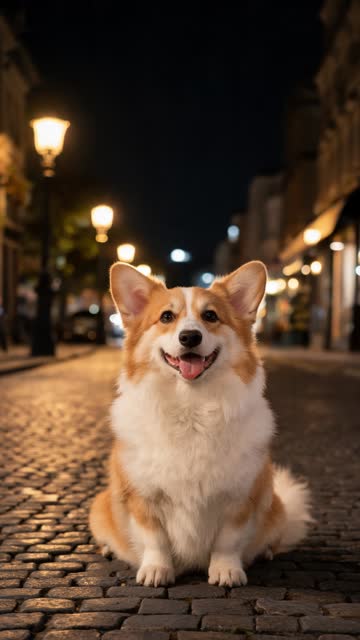
AI video · Girl + corgi · two photos
It isn't free. It's paid only, with credit packs and no subscription: Standard 480p is 100 credits and HD 720p is 180 credits, and 100 credits cost $9.90. Credits never expire, failed renders are refunded automatically, and unused credits can be refunded within 7 days. See pricing.
Side by side
| Feature | Hop Hop Hop AI | CapCut |
|---|---|---|
| What you start with | Two photos, or one photo of both | Your own video footage (or photos for a template) |
| Do you need to film? | No | Yes, to recreate the real routine |
| Need both people together? | No | Yes, for filming |
| Works with pets | Yes, from a photo | Only if your pet cooperates on camera |
| Hop hop hop routine built in | Yes | User-made "Hop hop hop" templates exist; contents vary |
| Editing control | None, you get a finished clip | Full: trims, text, effects, music |
| Cost | Paid credits, from $9.90 per Standard video | Free to use; paid plans add features (pricing varies by region) |
| Watermark | None | Depends on plan and assets used; check before exporting |
| Looks | AI-generated | Real footage of you |
When CapCut is the better choice
Be honest with yourself here. CapCut wins if:
- You and your partner are in the same place and happy to film.
- You have a good location, like a street, hallway or long room with space for one person to stand a few meters back.
- You want it to be real. Real footage has a charm AI can't fully copy, and some viewers prefer it.
- You want to edit: add text, cut it differently or add your own effects.
- You don't want to pay. CapCut can be used for free.
For filming tips, read What Is the Hop Hop Hop Trend?, which has a step-by-step section on shooting it yourself.
When Hop Hop Hop AI is the better choice
The AI route makes sense when filming isn't realistic:
- Long-distance friends or partners. You can't film a puppet swap from two cities, but you can upload two photos.
- Pets. Dogs and cats don't hop on command. With a good photo, your pet can take part. See Hop Hop Hop with Your Dog or Cat.
- No one to film with, or no space and no wish to hop down a public street.
- Speed. Photos in, finished video in a few minutes, no retakes.
Can you use both?
Yes. Some people make an AI version from photos, then open it in CapCut to add text or combine it with other clips before posting. Since our video has no watermark and no audio, it drops into any editor cleanly. Add the sound last, inside TikTok ("Add sound" → search "venadeaakira" → pick «Её парень»). See Hop Hop Hop Song for details.
Verdict
There isn't one winner. It depends on whether you can film.
- Can film together? Use CapCut (or just TikTok's camera). It's free and it's really you.
- Can't film together, or want your pet in it? Use Hop Hop Hop AI. Upload photos and get the finished clip from My Videos in minutes.
Want to see the photo route in detail? Read Hop Hop Hop AI Photo to Video, or use the generator above.
Hop Hop Hop AI is fan-made and isn't affiliated with TikTok, CapCut or ByteDance. CapCut details were checked in October 2026 and can change.
Sources
- CapCut template "Hop hop hop": https://www.capcut.com/template-detail/Hop-hop-hop/7609130997824670977
- CapCut, how to use templates: https://www.capcut.com/explore/how-to-use-templates
- CapCut, template videos: https://www.capcut.com/resource/capcut-template-videos
- CapCut, image to video AI guide: https://www.capcut.com/resource/image-to-video-ai-free-guide
- CapCut, how to make AI video of photos: https://www.capcut.com/resource/make-ai-video-of-photos
- CapCut on Wikipedia: https://en.wikipedia.org/wiki/CapCut