Hop Hop Hop with Your Dog or Cat: The Pet Version of the Trend
 Hop Hop Hop AI Team
How to make a hop hop hop video with your dog or cat: choosing the Pet subject, the best pet photos to upload, who should be the puppet master, what to expect from the AI, and tips for posting.
Make your hop hop hop video
Puppet master first
Hops first
Best results: one clear, front-facing subject per photo, waist-up or full body, good light. No sunglasses or heavy filters.
You'll get a 9-second silent video — add the original TikTok sound when you post.
You'll sign in first — your photos stay selected.
You've seen the hop hop hop trend and thought your dog would be perfect for it. Then you remembered your dog won't even sit on command. Doing hop hop hop with your dog or cat for real means getting a pet to bounce on cue for a few seconds while someone else films. That rarely works. This guide shows how to make the pet version from photos with Hop Hop Hop AI, and how to get the best result.
What the pet version looks like
The trend is a duo video. One subject stands close to the camera and "pulls invisible strings" over the other's head. The other hops and bounces in the background like a puppet. Around the middle of the clip, they swap.
In the pet version, one of the two is your dog or cat. Here's a real example, made from two photos: one of a girl and one of her corgi.
Input photos
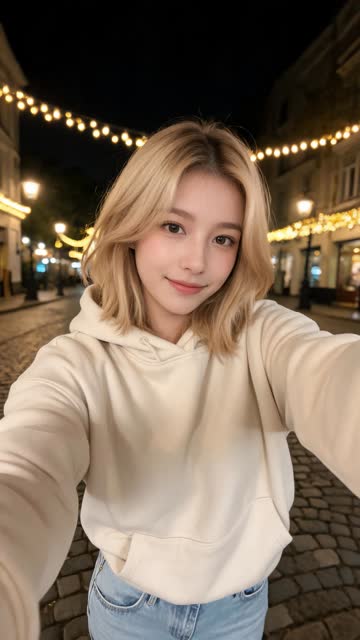
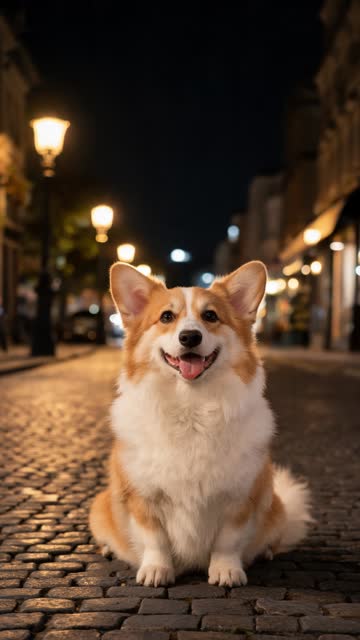
AI video · Girl + corgi · two photos
You get a ~9-second vertical (9:16) video with no watermark. It's silent, so you add the trend sound in TikTok when you post.
Step 1: Choose the "Pet" subject
In the generator, each subject is set as a person or a pet. Set your animal's photo to Pet. This tells the AI it's working with an animal, not a person, which changes how it moves the body.
You can pair:
- You and your pet, the classic version.
- Two pets, such as a dog and a cat from the same house, or your pet and a friend's.
- A friend and your pet, if you'd rather stay off camera.
Use two photos, one subject in each. A single photo with both of you can work, but sharp photos of a person and a pet together are hard to take, so separate photos usually give a better result.
Step 2: Pick the best pet photo
Pet photos are where most results are won or lost. Look for:
- The whole body. Head, legs, paws and tail all in frame. The AI needs to see the body to make it hop.
- Eyes visible. A face turned toward the camera, not away or hidden behind a toy.
- Good light. Daylight near a window or outdoors is ideal. Dark-coated pets especially need bright light, or they turn into a shapeless blob.
- No blur. Pets move fast. Pick a photo taken when they were still, or use burst mode and choose the sharpest frame.
- A simple background. A plain floor, lawn or wall helps the pet stand out. Avoid busy blankets or piles of toys.
- Only one animal. Crop out other pets and people.
What to avoid: costumes that hide the body, heavy filters, tiny crops of just the face, and screenshots of old photos.
If your photos are on your phone and you're on a computer, scan the QR code in the generator to send them straight from your phone.
Step 3: Who should be the puppet master?
In the trend, the roles swap halfway through, so both subjects get a turn. Still, think about who opens the video:
- You as puppet master first is the classic setup. You "control" your pet, then the pet takes over and you're the one hopping. The reversal is the punchline: your pet gets revenge.
- Your pet as puppet master first is funnier if your pet already acts like the boss of the house.
Either way works. Choose the one that fits your pet's personality and your caption.
Step 4: Choose Standard or HD and generate
| Quality | Resolution | Credits |
|---|---|---|
| Standard | 480p | 100 |
| HD | 720p | 180 |
Fur detail is where HD helps most, especially on fluffy or long-haired pets. Standard is fine for a first try.
A video takes about 2–3 minutes. You can close the page, and we'll email you when it's ready. It'll be in My Videos for 90 days. If a render fails, your credits come back automatically. Credits never expire. See pricing for packs.
What to expect from the AI
It's good to set expectations, especially with animals.
- Your pet should still look like your pet. The AI aims to keep the breed, coat color, markings and fur texture from your photo. A clear photo makes this much more reliable.
- Animals hop, they don't dance. A dog or cat won't do human dance moves. Expect bouncing, hopping and springy jumps that fit how a four-legged animal moves.
- Fluffy and dark pets are harder. Very fluffy coats and black fur hide body shape. Bright, sharp photos help a lot.
- AI isn't perfect. Legs and paws are the trickiest parts. If something looks clearly broken, try a different photo with the whole body visible.
Step 5: Post it
- Get it on your phone. Download from My Videos. Made it on a computer? Scan the QR code next to the video to send it to your phone.
- Upload to TikTok and tap Add sound. Search "venadeaakira" and pick «Её парень» (the 0:11 sound with 100K+ videos), or pick it from Favorites if you saved it from another hop hop hop video. Use the in-app sound, not a downloaded copy. More in Hop Hop Hop Song.
- Line up the beat with the swap in the middle.
- Write a short caption. Pet captions work well when they're from the pet's point of view, like "when I finally get control" or "who's the pet now?"
- Use the trend hashtags, like #hophophop, plus a pet tag such as #dogsoftiktok or #catsoftiktok.
- Label it as AI-made if TikTok offers the AI-generated content label.
Got a pet account? Post it there and tag your own account so both sets of followers see it.
A few good ideas
- Your pet versus your partner. Who really runs the house?
- Two pets that don't get along. The swap writes the joke for you.
- A pet you miss. Some people use photos of a pet who has passed away. Pick a photo you love.
Ready to hop?
Pick your clearest photo of your pet, a photo of yourself, and use the generator above. For more on photo choice, read Hop Hop Hop AI Photo to Video. Wondering whether to film it instead? See Hop Hop Hop AI vs CapCut.
Hop Hop Hop AI is fan-made and isn't affiliated with TikTok.